
Providing liquidity on Somnia.exchange lets you earn trading fees while supporting the network’s DeFi ecosystem. This tutorial walks through the complete process of adding and removing liquidity from pools.
When you provide liquidity, you’re depositing two tokens into a trading pool that others can swap against. In return, you receive LP (Liquidity Provider) tokens representing your share of the pool. As traders use the pool, you earn a portion of their fees proportional to your stake.
In addition to trading fees, you’ll also be earning points for the Somnia Liquidity Points Program.
Getting Started
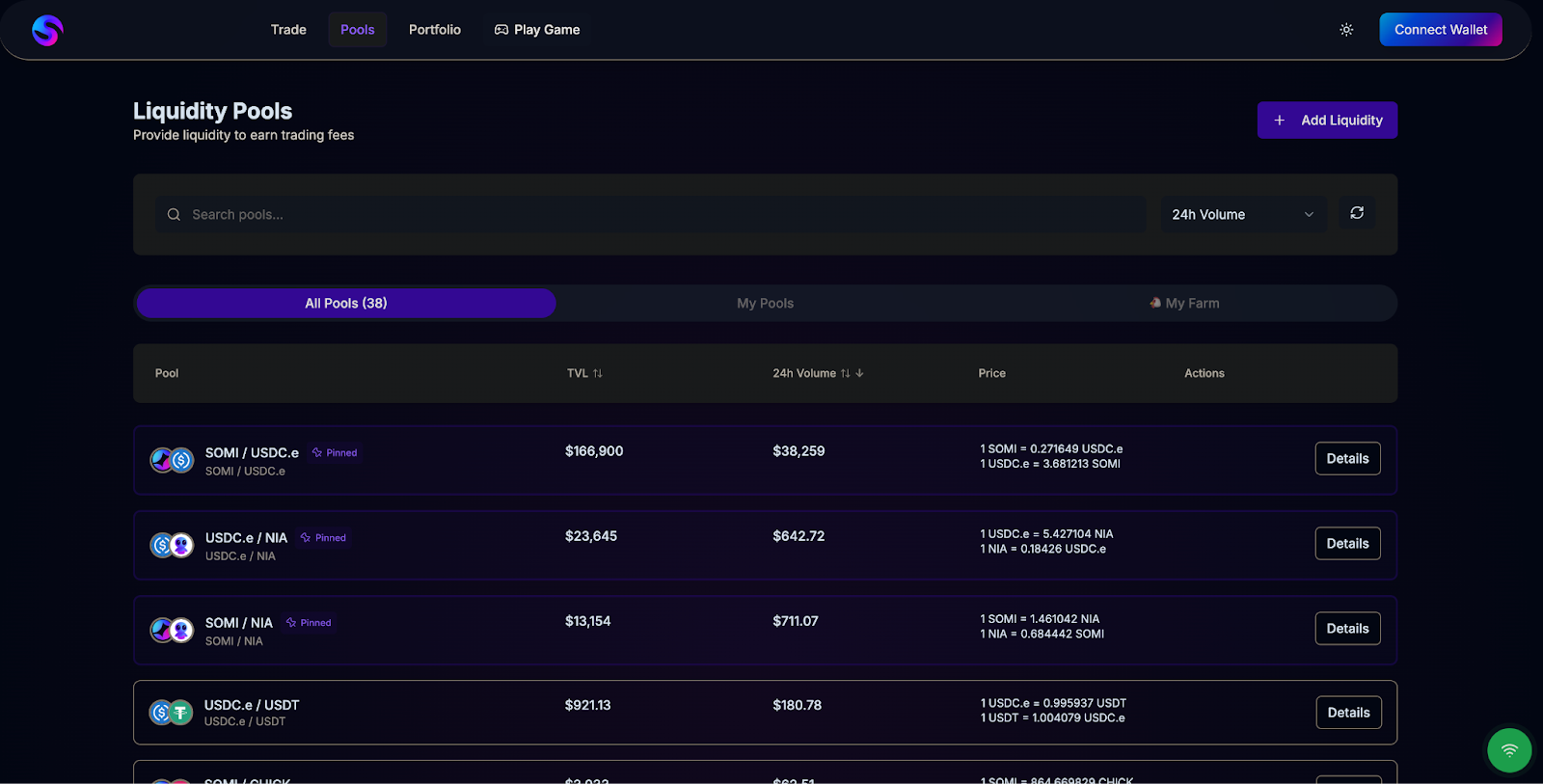
First, navigate to the “Pools” section on Somnia.exchange. You’ll see a list of available liquidity pools ranked by 24-hour trading volume. Each pool displays its total value locked (TVL), current 24h volume, and APR (Annual Percentage Rate) from trading fees.
The interface defaults to showing “All Pools,” but you can filter to “My Pools” once you’ve provided liquidity, or “My Farm” if you’re staking LP tokens for additional rewards.
Adding Liquidity
Click “Add Liquidity” on your chosen pool. This opens a modal where you’ll specify how much of each token to deposit.
The interface shows two token fields: Token A and Token B. Each displays your current balance in the top right. Use the dropdown menus to select which tokens you want to provide. The SOMI token is native to Somnia, while USDC.e is a bridged version of USDC on the network.
Start by entering an amount for Token A. The interface automatically calculates the required amount of Token B based on the current pool ratio. You can also click the arrows icon between the fields to swap which token you’re entering first.
If you want to deposit your entire balance, you can typically click “Max” next to the balance display.

Reviewing Pool Information
Before confirming, the interface displays several key metrics:
Pool Status shows whether the pool is active. If it displays “Active Pool,” you’re good to proceed.
Current Reserves shows how much of each token is already in the pool. In the example above, the pool contains 307,439 SOMI and 84,009 USDC.e. Larger reserves generally mean more stable pricing and lower slippage for traders.
Pool Ratio displays the current exchange rate. Understanding this helps you gauge whether you’re adding liquidity at a fair price.
Your Share After shows what percentage of the pool you’ll own after this deposit. Starting from 0% means you’ll be one of the first providers, which comes with both higher potential rewards and higher risk.
Slippage Tolerance controls how much price movement you’ll accept during the transaction. The default 0.1% works for most situations. You can adjust this by clicking the settings icon if you’re adding a large amount or if the transaction fails.
Confirming the Transaction
Once you’ve entered amounts and reviewed the details, click “Enter Amounts” to proceed. This activates the confirmation flow.
Depending on whether this is your first time providing these tokens, you might need to approve token spending before adding liquidity. The interface will prompt you to “Approve” one or both tokens, which gives the smart contract permission to move your tokens.
After approval, click “Add Liquidity” to execute the deposit. Your wallet will prompt you to confirm the transaction. Once confirmed and processed, you’ll receive LP tokens representing your share of the pool.
These LP tokens sit in your wallet like any other token. They track your ownership and let you remove liquidity later.
Removing Liquidity
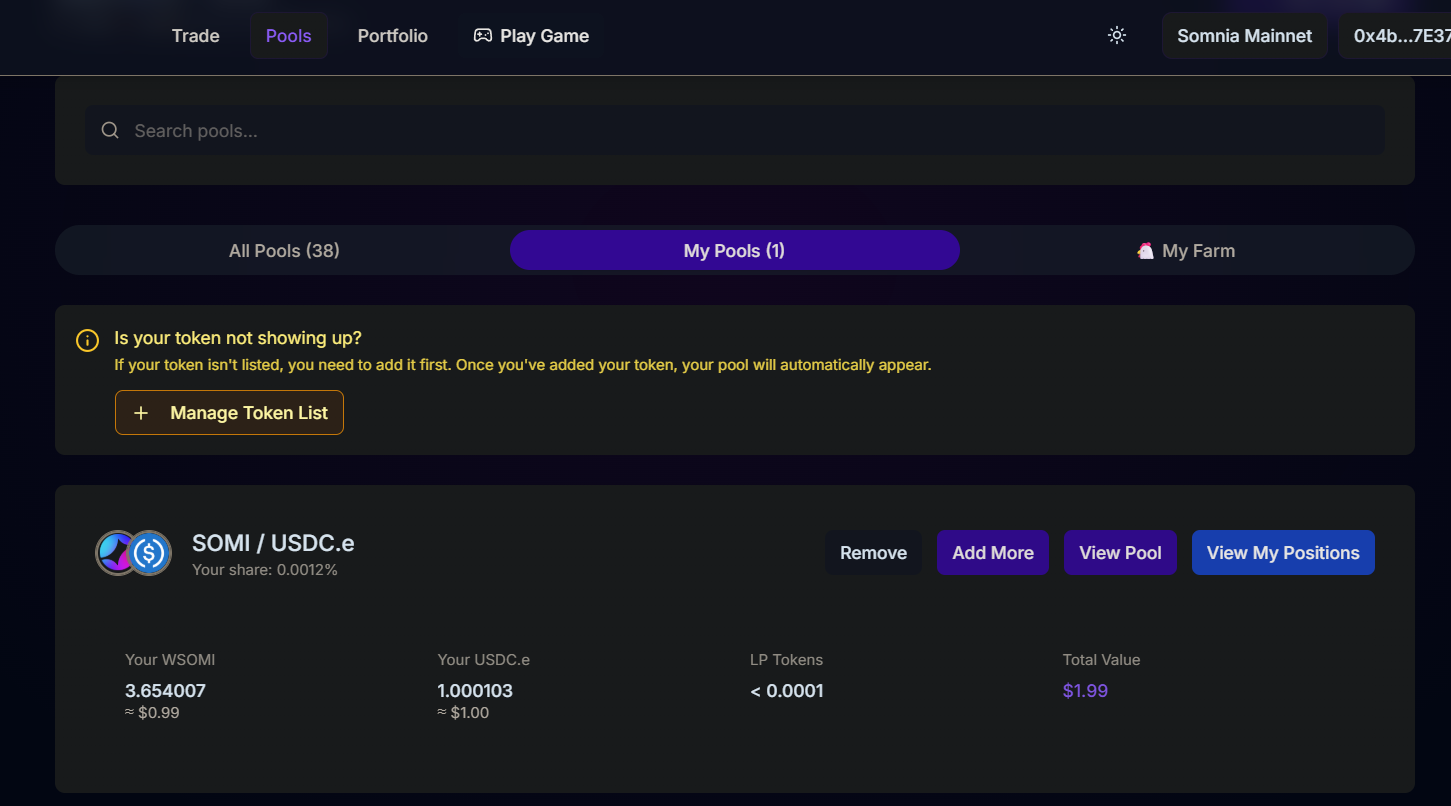
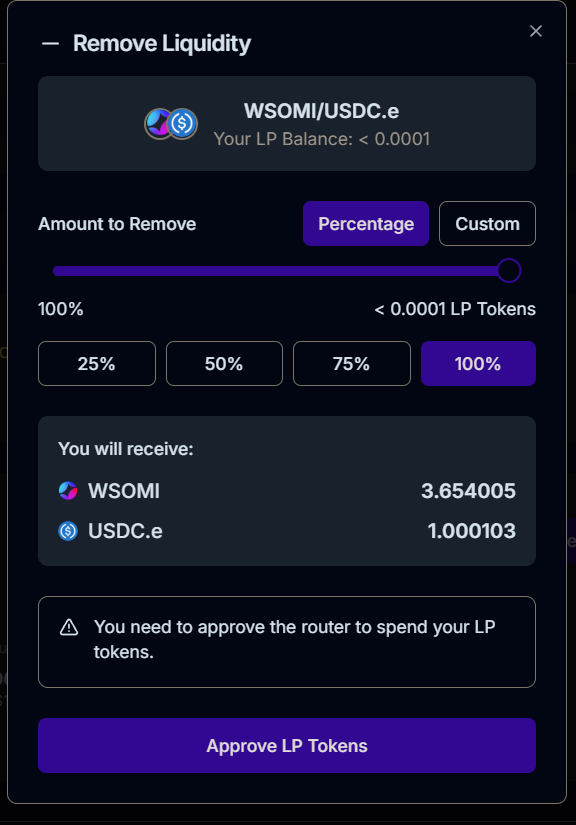
When you want to withdraw navigate to “My Pools,” and click “Remove” on your position. This opens a removal interface showing your LP token balance.
Choosing How Much to Remove
You can remove a percentage of your position or specify a custom amount. The interface provides quick buttons for 25%, 50%, 75%, and 100%, or you can drag the slider to any percentage.
As you adjust the amount, the “You will receive” section updates to show exactly how much of each token you’ll get back. These amounts reflect your share of the current pool reserves, which might differ from what you originally deposited because the pool ratio shifts as people trade.
Earn More With Liquidity Points
Providing liquidity on Somnex, Quickswap, Somnia Exchange or Tokos is one of the most direct ways to participate in Somnia’s growth while earning both trading fees and Liquidity Points.